API Documentation
API and description of the technical features of integrations with third parties systems
v.1.0
Zapier
Two main actions in entortools for Zapier(v.1.0)
Course purchase
— used to provide access to a course.
Endpoint URL API:
https://app.mentortools.com/entity_api/ipn/paymentRequired fields:
product-id- course ID to which access is granted
buyer-email- email of the access recipient
buyer-first-name- first name of the access recipient
buyer-last-name- last name of the access recipient
When the action is triggered, the system leads to the registration of the user with the specified email (buyer-email). A password is generated automatically and all information is sent to user via email configuration of the Mentortools portal.
Notice:
Registration occurs if the user with this email has not been previously registered. Otherwise, they just get access to the course withproduct-id.
Course refund
— closes access to the course.
Endpoint URL API:
https://app.mentortools.com/entity_api/ipn/refundRequired fields:
product-id(id of the refunded course) - access will revoked to this course
buyer-email- email used to revoke access
buyer-first-name- first name to revoke access
buyer-last-name- last name to revoke access
If triggered, the system will disable access to the specified course (bycourse-id) for the user with the specified email (buyer-email)
API key
The key is automatically generated inside Mentortools. To get the key, navigate to:
Settings -> Payments. Click on the "Generate" button and copy your API-key:
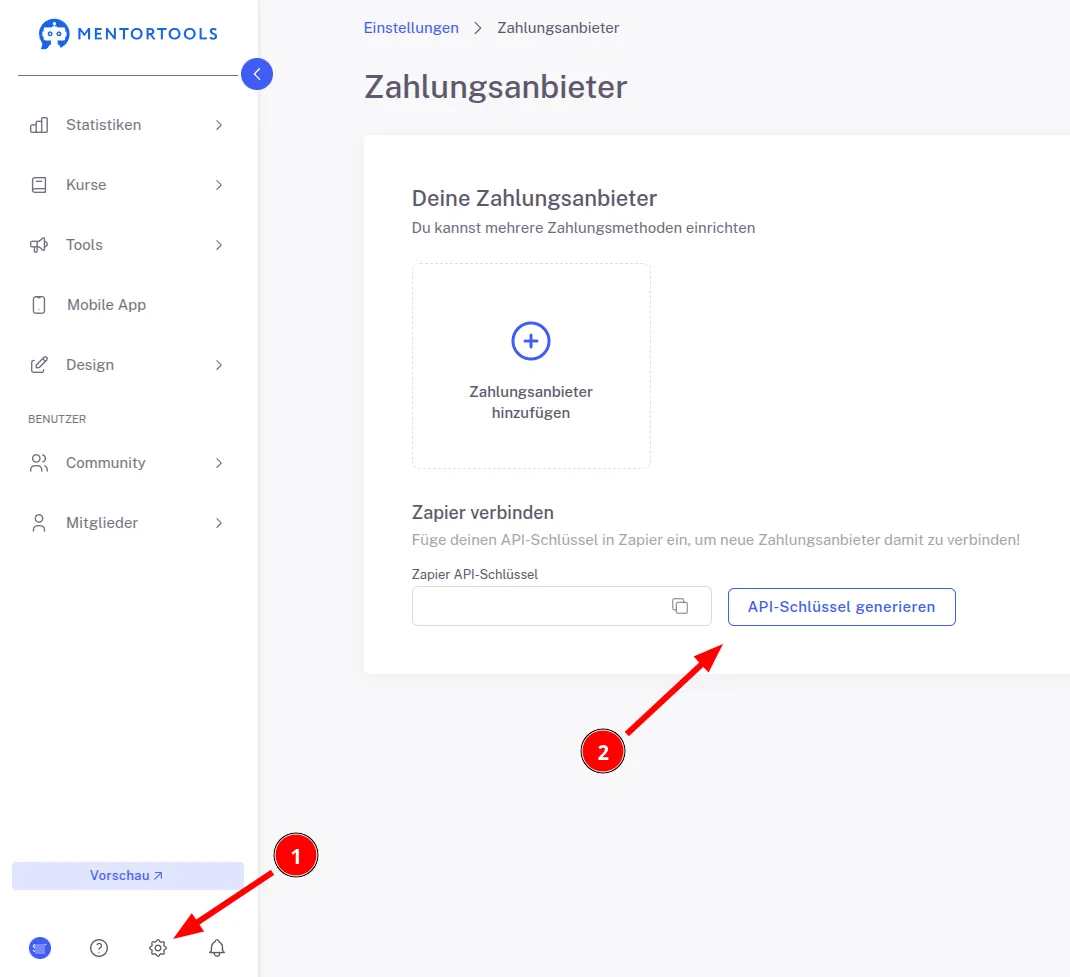
This key us used to authenticate the request from Zapier when connecting the Mentortools Account with Zapier.